Bi-Winning Deposit Method Complete Guide: Fees, Steps & Important Notes Explained
Summary of Bi-Winning deposit methods. To start Binary Options trading on Bi-Winning, you first need to deposit funds into your account. Currently, Bi-Winning offers 4 deposit methods to choose from...
Try a free demo now
Experience the real trading environment without using real money
Summary of Bi-Winning Deposit Methods
To start Binary Options trading on Bi-Winning, you first need to deposit funds into your account. Currently, Bi-Winning offers 4 deposit methods to choose from.
Available Deposit Methods
Deposit Method | Minimum Deposit | Processing Time | Fees | Rating |
|---|---|---|---|---|
PESKA | 5,000 yen | Instant | Free | ★★★★★ |
Bank Transfer | 50,000 yen | 1-3 business days | Transfer fee only | ★★★☆☆ |
Cryptocurrency (BTC) | 0.001 BTC equivalent | Approx. 30 min - 1 hour* | Network fee only | ★★★★☆ |
Cryptocurrency (USDT) | 50 USDT | Approx. 10-30 min* | Network fee only | ★★★★☆ |
PoiTouch | 5,000 yen | Instant | Free | ★★★☆☆ |
What's especially noteworthy is that as of March 2026, Bi-Winning is running a 10% bonus campaign for PESKA deposits (for detailed terms and conditions, please check the official website). This means if you deposit 50,000 yen, 55,000 yen will be credited to your account — quite a great deal.
*The types of deposit/withdrawal methods and the availability of each payment service may change at any time due to system maintenance or partnership status. For the latest supported methods, always check the Bi-Winning official website "Deposit/Withdrawal" section in My Page.
How to Deposit via PESKA (Recommended - With Bonus)
If you're depositing to Bi-Winning for the first time, PESKA is the best recommendation. The reason is simple: you get a 10% bonus and it's reflected instantly.

Benefits of Choosing PESKA
PESKA is officially recommended on the Bi-Winning website, and here's what you'll find when actually using it:
- Minimum Deposit: From 5,000 yen
- Processing Time: Reflected instantly
- Fees: Completely free
- Bonus: 10% deposit bonus (see official site for detailed terms)
- Availability: 24 hours, anytime
Prepare PESKA in Advance for Smooth Deposits
Setting up a PESKA account in advance will make the actual deposit process much smoother.
- PESKA Official Website (New Registration)
Open a free account here - Detailed Setup Guide
If you're unsure about the process, check out the official PESKA Setup Manual from Bi-Winning.
Get prepared in advance so you can deposit and start trading without missing opportunities.
PESKA Deposit Steps
Step 1: Select PESKA
Log in to Bi-Winning and go to the "Deposit" page. You'll see several options at the top of the screen. Among them, "PESKA" has a "Recommended!" label, so it's easy to spot.
Step 2: Set the Amount
Enter the amount you want to deposit. You can deposit from 5,000 yen, but considering the 10% bonus, depositing a larger amount gives you more value.
Step 3: Complete Payment
Click the "Deposit" button and you'll be redirected to the PESKA payment screen. Enter your credit card information and complete the payment.
Step 4: Confirm Deposit Once payment is complete, the amount is immediately reflected in your Bi-Winning account. The 10% bonus is also applied at the same time.
Things to Watch Out for When Using PESKA
- Be careful not to enter incorrect card information
- 3D Secure authentication may be required
- The bonus may be subject to terms and conditions — check the official site for details
Deposit via Bank Transfer
Bank transfer is the traditional, reliable method. However, with Bi-Winning, the minimum deposit is set higher than other methods, and it takes time to process.

Bank Transfer Features
- Minimum Deposit: From 50,000 yen (higher than other methods)
- Processing Time: 1-3 business days (excluding weekends and holidays)
- Fees: Transfer fee only (depends on your bank)
- Security: Industry-standard reliable and secure method
Detailed Bank Transfer Steps
Bi-Winning's bank transfer works a bit differently — you need to submit a deposit request with the planned amount first. This is to streamline the deposit processing, but it might be a bit confusing the first time.
The key thing to know is that instead of making a bank transfer directly, you first need to submit a request on Bi-Winning saying "I plan to transfer approximately this amount."
Step 1: Submit Transfer Amount
- Select "Bank Transfer" on Bi-Winning's deposit page
- Enter the amount you plan to transfer (50,000 yen or more)
- Click the "Deposit" button
- Transfer destination information will be displayed on screen
Step 2: Check Transfer Destination Information
The transfer destination displayed on screen looks something like this:
- Bank Name
- Branch Name
- Account Number (e.g., Bi-Winning(JPY)-1454852)
- Account Holder Name
We recommend taking a screenshot or noting this information to avoid mistakes.
Step 3: Make the Transfer
You can use either ATM or online banking. However, make sure the transfer is made under the same name registered with Bi-Winning.
Step 4: Wait for Processing
On weekdays, it typically takes 1-3 days to process. On weekends and holidays, banks are closed, so it won't be processed during that time.
Important Points for Bank Transfers
- Minimum Amount: 50,000 yen minimum, not suitable for small deposits
- Weekdays Only: Even if you transfer on weekends, it won't be processed until Monday
- Same Name Required: If the transfer name doesn't match the account name, the deposit won't be processed — please be careful
How to Deposit via Cryptocurrency (BTC/USDT)
Cryptocurrency deposits are very convenient for those who already hold Bitcoin or USDT. Bi-Winning supports multiple cryptocurrencies and allows relatively small deposits.

Supported Cryptocurrencies
Bi-Winning supports the following cryptocurrencies:
- Bitcoin (BTC): From 0.001 BTC
- USDT (TRC20): From 50 USDT
- USDT (ERC20): From 50 USDT
- USDT (BSC): From 50 USDT
Cryptocurrency Deposit Steps
Step 1: Select Currency
On the deposit page, select "Bank Transfer / BTC / USDT" and click the icon of the cryptocurrency you want to use. BTC has an orange icon, USDT has a green icon.
Step 2: Select Network (for USDT)
If you chose USDT, you need to decide which network to use:
- TRC20: Low fees — recommended
- ERC20: Ethereum network
- BSC: Binance Smart Chain
Step 3: Enter Amount
Enter the amount you want to send. Make sure it's above the minimum.
Step 4: Get Address
Click "Deposit" and a QR code and deposit address will be displayed. Make absolutely sure to copy and paste this address without errors.
Step 5: Send Funds
Send funds from your cryptocurrency wallet to the displayed address.
Step 6: Wait for Processing
Generally, BTC takes 30 minutes to 1 hour, USDT takes 10-30 minutes, but this may vary depending on Bi-Winning's processing and network conditions. During congestion, it may take longer.
Important Safety Notes for Cryptocurrency Deposits
Address Errors Are Critical Cryptocurrency transfers cannot be reversed once sent. If you send to the wrong address, you may lose your funds. Always use copy-paste and double-check before sending.
Don't Select the Wrong Network For USDT, the sending network and the network selected on Bi-Winning (TRC20, ERC20, BSC) must match. Sending on the wrong network may result in loss of funds.
Below Minimum Is Not Accepted If you send less than the minimum deposit amount, it won't be credited to your account. You need at least 0.001 BTC for Bitcoin and 50 USDT for USDT.
PoiTouch Deposit Steps
PoiTouch is a deposit method that uses DEPOT electronic money. Pre-purchasing DEPOT is required, but Bi-Winning offers this as an option for those who value privacy.

PoiTouch Features
- Minimum Deposit: From 5,000 yen
- Processing Time: Reflected instantly
- Fees: Free on Bi-Winning (separate fee may apply when purchasing DEPOT)
How to Deposit via PoiTouch
Preparation: Purchase DEPOT
To use PoiTouch, you first need to purchase "DEPOT" electronic money.
- Pribox — access this service
- Purchase DEPOT in your desired amount (choose from 5,000/10,000/20,000/30,000/50,000/100,000 yen)
- Pay via ATM or online banking Pay-easy
- Receive a 16-digit DEPOT prepaid number
Step 1: Select PoiTouch
Select "PoiTouch" on Bi-Winning's deposit page.
Step 2: Enter Amount
Enter the amount you want to deposit. Make sure it's within the range of the DEPOT you purchased.
Step 3: Start Payment
Click the "Payment" button, then click "Proceed to Purchase." You'll be redirected to the DEPOT payment site.
Step 4: Enter DEPOT Number
Enter the 16-digit DEPOT prepaid number you purchased earlier and click "Complete Payment."
Step 5: Complete
Once authentication is complete, you'll be redirected back to the Bi-Winning site and the deposit is done.
Notes When Using PoiTouch
- Pre-purchasing DEPOT is required, but this method allows for more privacy
- A fee may apply when purchasing DEPOT
- Keep the 16-digit number safe and be careful not to enter it incorrectly
Common Deposit Questions & Solutions
Here's a summary of common questions from Bi-Winning user support. These cover the most common issues you might encounter when depositing.
FAQ 1: Wrong Minimum Deposit Amount
Question: I deposited less than the minimum amount for the deposit method
Answer:
- PESKA/PoiTouch: Try again with 5,000 yen or more
- Bank Transfer: Try again with 50,000 yen or more
- Cryptocurrency: Send again with at least 0.001 BTC or 50 USDT
FAQ 2: Sent Cryptocurrency to Wrong Address
Question: I sent to the wrong address or used the wrong network
Answer:
- Contact Bi-Winning support immediately
- Save the transaction hash (TXID)
- Unfortunately, recovery is often difficult, so please be careful with addresses
FAQ 3: Bank Transfer Name Mismatch
Question: The transfer name and Bi-Winning registered name are different
Answer:
- Contact Bi-Winning support and send the transfer receipt
- Make sure to use the registered name for future transfers
- Avoid making transfers under a family member's name
FAQ 4: Deposit Not Reflected
Question: I completed the procedure but the deposit isn't showing in my account
First, check:
- Has enough time passed? (minutes for crypto, days for bank transfer)
- Did you meet the minimum deposit amount?
- Was the destination information correct?
- Is the system currently under maintenance?
Answer: If everything checks out, contact Bi-Winning support. Having transaction receipts or transfer proofs will speed up resolution.
Deposit Method Comparison & Recommendations
Here are our recommendations based on the features of each deposit method.
Best for Beginners: PESKA Deposit
Recommended for:
- Binary Options beginners
- Those who want to start trading immediately
- Those who want to take advantage of bonuses
Why: You get a 10% bonus, it's reflected instantly, so you can start trading right away. The process is simple, making it the best choice for first-timers.
For Large Deposits: Bank Transfer
Recommended for:
- Those considering deposits of 500,000 yen or more
- Those who prefer the industry-standard reliable method
- Those who don't mind transfer fees
Why: It's the most reliable and secure option. For large deposits, the added security is worth the extra processing time.
If You Hold Crypto: BTC/USDT Deposit
Recommended for:
- Those who already hold cryptocurrency
- Those experienced with international transfers
- Those with a certain level of knowledge
Why: Low fees and reasonably fast processing. However, there's a risk of transfer errors, so this is better suited for experienced users.
Conclusion
We've looked at Bi-Winning's deposit methods in detail, and ultimately PESKA deposit is the top recommendation.
The reasons are simple:
- 10% bonus for great value (see official site for terms)
- Instant processing — no waiting
- Simple process with low risk of errors
- Officially recommended by Bi-Winning
If you're just getting started with Binary Options, we especially recommend trying your first deposit with PESKA.
For large deposits, bank transfer is also a good option. It's a solid choice when you want the industry-standard reliable method for deposits of 50,000 yen or more.
If you have cryptocurrency, BTC/USDT deposit is also convenient, but please be extra careful about transfer errors.
Whichever method you choose, as long as you follow the minimum deposit amounts and precautions, you can deposit safely. If you have any questions, contact Bi-Winning support and enjoy your Binary Options trading with peace of mind.
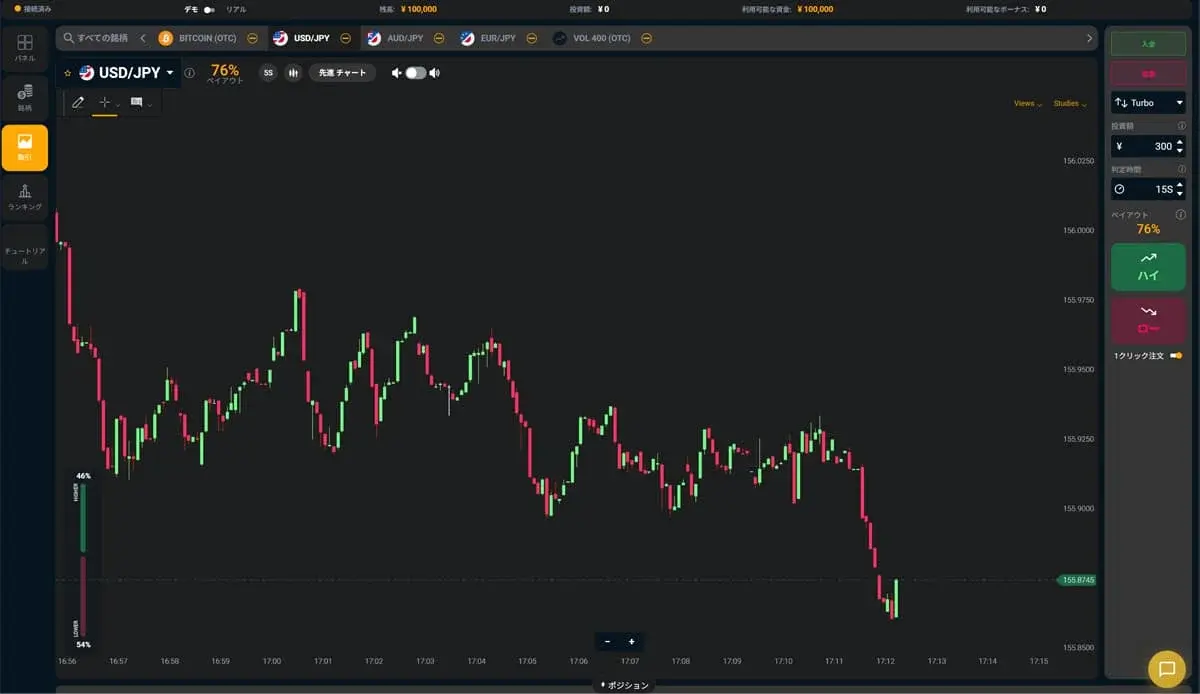
Experience the Bi-Winning trading platform risk-free
Try the Bi-Winning trading platform for free right now. No registration required to try High/Low trading. Your demo account comes with 100,000 JPY in virtual funds.
Try a free demo now
Experience the real trading environment without using real money
Company Information
Providing a safe, secure, and comfortable trading environment for all investors.
| Company | Alpha Options LLC |
| Location | Euro House, Richmond Hill Road, Kingstown, St. Vincent and the Grenadines |
| Support Hours | 10:00 – 17:00 (JST)Excluding weekends, holidays, and year-end closures |
| Business Succession | Succeeded from BET GLOBAL MARKET INC. on February 7, 2025 |
| Contact | Contact Us |
| Official Twitter | https://x.com/BIWINNING1 |
関連記事

Bi-Winningのサインツール設定方法:MT5への設置手順を画像つきで解説
Bi-Winningのサインツール設定方法を、提携先EdgeGraph FXの口座開設からMT5への設置・表示まで画像つきで解説。IndicatorsフォルダへのファイルのいれかたやM1の設定、表示されないときの対処まで初心者の方向けにまとめました。

How to Deposit via PoiTouch on Bi-Winning: From DEPOT Purchase to Confirmation
We explain how to complete a PoiTouch deposit on Bi-Winning in an easy-to-follow, two-stage process starting with a DEPOT purchase — 11 steps in total. This beginner-friendly guide covers the essentials (a 5,000-yen minimum and instant crediting), things to watch out for when buying multiple DEPOTs or if your deposit isn't reflected, and a comparison with other deposit methods.
What to Watch Out for When Trading During Economic Indicator Releases | Key Precautions for Beginners
When economic indicators are released, the market can swing sharply, bringing risks you don't normally face, such as widening spreads and slippage. This article clearly explains what binary options beginners should watch out for when trading around indicator releases, along with concrete steps to reduce risk.